
A picture is worth a thousand words, as they say, and in the world of digital marketing, that's never been more true. In an era where consumer attention is more fragmented than ever, using the image extension in Google Ads can be a powerful tool for capturing attention, conveying a message, and ultimately driving more conversions. Let's dive into the details.
What Is the Google Ads Image Extension?
The image extension is a Google Ads feature that lets advertisers add images to their text ads. It gives you the ability to visually showcase your products or services, adding an extra dimension to your ad that can significantly boost user engagement.
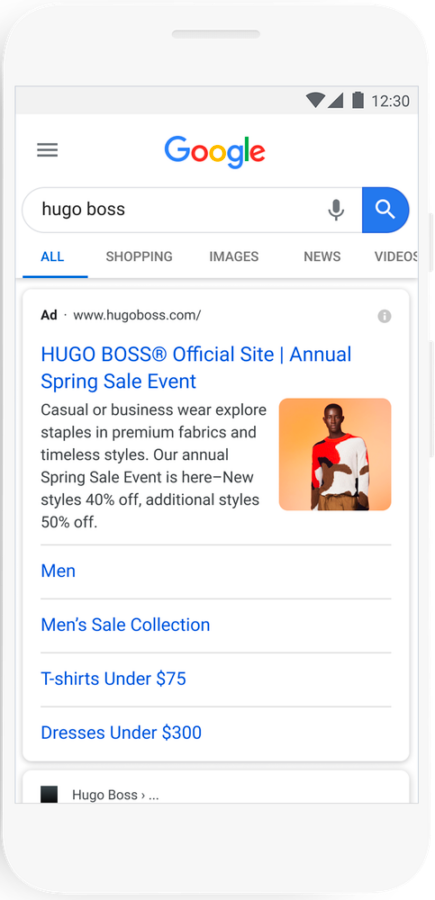
Why Does It Matter?
- Improved visibility: Ads with images are more visible and eye-catching, which increases the likelihood of being seen and clicked.
- Higher click-through rate (CTR): Images can help increase your ads' click-through rate, which in turn can improve your quality score and lower your cost per click.
- More conversions: Images can help drive conversions by giving consumers a preview of what to expect from your product or service before they even click on your ad.
How to Set Up the Image Extension in Google Ads
Setting up the image extension in Google Ads is a quick and straightforward process. Here's how to do it:
- Go to your Google Ads account: Sign in to your Google Ads account and click the "Ads and assets" tab in the left menu, then "Assets".
- Add a new extension: Click the "+" button and select "Image extension" from the dropdown menu.
- Upload your image: Upload the image you want to use. Make sure it meets Google's specifications for extension images.
- Ad link and text: Add the URL where your ad should direct users when they click on the image. Also add your ad copy.
- Save and preview: Once you're done, save your extension and preview your ad to make sure everything looks right.
Best Practices for Using the Image Extension in Google Ads
Using the image extension in Google Ads may seem straightforward, but there are some best practices to keep in mind to maximize its effectiveness.
Choose High-Quality Images
This may seem obvious, but it's crucial to use high-quality images. A blurry or poorly framed image can leave a bad impression of your brand.
Make Sure the Image Is Relevant
Your image should be directly related to the product or service you're promoting. This helps users understand what you're offering at a glance.
Test Different Images
As with any marketing strategy, testing is essential. Try different images to see which ones attract the most attention and drive the most conversions.
Follow Google's Guidelines
Google has specific guidelines for extension images. Make sure you follow them to avoid any issues.
Impact of the Image Extension on Google Ads Performance
The image extension has the potential to significantly improve the performance of your Google Ads. By adding a visual dimension to your ads, you can attract more attention, increase clicks, and potentially boost conversions.
Conclusion
The image extension in Google Ads is a powerful tool for improving the visibility and effectiveness of your ads. By adding a visual layer to your ads, you can capture users' attention, increase clicks, and potentially drive more conversions. Remember to follow Google's guidelines and test different images to maximize the effectiveness of your ads.
The digital marketing landscape is constantly evolving, and as advertisers, we need to adapt and take advantage of every feature available to stay competitive. So don't be afraid to dive in and experiment with the image extension in Google Ads. You might be pleasantly surprised by the results!
Want support with your digital marketing strategy? Don't hesitate to reach out!
FAQs
Q: Is the image extension available for all Google Ads ads?
A: No, the image extension is currently only available for certain text ads on the Search Network.
Q: Are image extensions free?
A: There is no additional cost to add an image extension to your ad. You only pay when someone clicks on your ad.
Q: What happens if I don't follow Google's guidelines for extension images?
A: If you don't follow the guidelines, your image extension may be disapproved. In some cases, your account may be suspended.


