
You search for a product on Google. Several results come up, but one ad catches your eye more than the others. Unlike the other ads that display a default icon, the link that grabs your attention shows a brand logo. This ad extension is a logo extension, and it's an important asset for improving your business's visibility in Google search results.
Logo extensions are an effective way to showcase your business, set it apart from competitors, and achieve higher click-through rates than ads without them. In this article, we'll explain why and how to use logo extensions in Google Search ads.
Why Use Logo Extensions in Google Search Ads?
Logo extensions offer several advantages for your business. Here are a few:
- Build trust with your users: when your logo appears in search results, your ad inspires more confidence than one with a default icon, giving users the sense that they're visiting a trustworthy site.
- Improve brand recognition: your logo is the symbol of your business and should be easy to recognize. By displaying it in Google Search ads, you strengthen brand recognition and increase consideration among users who already know you.
- Increase click-through rates: logo extensions attract users' attention and boost click-through rates on your ads. The more clicks your ad gets, the more visibility your business gains.
- Drive conversions: by increasing click-through rates on your ads, logo extensions can also drive conversions and improve your return on ad spend (ROAS).
How to Use Logo Extensions in Google Search Ads
Now that you know the benefits of logo extensions, let's look at how to use them in Google Search ads.
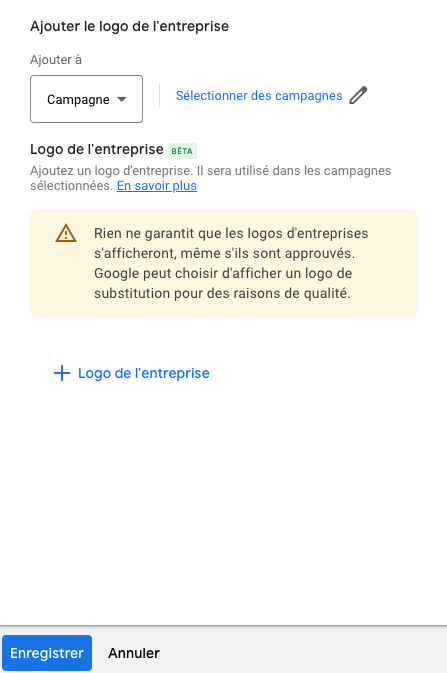
- Sign in to your Google Ads account, go to the campaign you want to edit, and click "Ads and assets" then "Assets".
- Select the "Business logo" type and click the blue + button.
- Make sure your logo is high-quality and meets Google Ads guidelines, then add it.
Conclusion
Logo extensions in Google Search ads are an excellent way to improve your business's visibility and stand out from the competition. By using this free feature, you can increase click-through rates on your ads, strengthen brand recognition, and drive additional conversions. There's no good reason not to use them!
Want support with your digital marketing strategy? Don't hesitate to reach out!
FAQs
Q: How much does it cost to use logo extensions in Google Search ads?
A: Using logo extensions in Google Search ads doesn't cost anything beyond what you'd pay for other ad extension types. You'll be charged for each click on your ad, but using logo extensions doesn't generate any additional costs.
Q: Does my business need to meet specific criteria to use logo extensions in Google Search ads?
A: Your business must comply with Google Ads quality and relevance guidelines to use logo extensions in Google Search ads. However, there are no specific criteria you need to meet beyond that.
Q: Can I use images other than my logo for logo extensions in Google Search ads?
A: No, Google Ads requires that logo extensions display only your business logo. You cannot use other images or graphics for logo extensions in Google Search ads.
Q: How can I tell whether logo extensions are impacting the performance of my Google Search ads?
A: You can use Google Ads tracking tools to monitor the performance of your Google Search ads and check whether using logo extensions has a positive impact on click-through rates and conversions.


