
Over 500 million Stories are posted every day on Instagram.
Whether you're among the 50% of brands already using Stories, or you're still thinking about it, everyone asks the same question: how do you create content that grabs attention and drives engagement? While 60% of the organic Stories brands publish include an interactive element, like a hashtag or an @ mention, it's now possible to do the same with sponsored stories. You can use the poll sticker, which lets your audience interact with your brand by answering a question and then viewing the poll results. Today, we're going to explore everything this sticker can do for businesses!
Encourage your audience to engage with your brand's content.
Interactive polls in Instagram Stories allow brands to adopt a lighter, more approachable communication style and generate audience engagement, bringing the brand closer to consumers.
These polls also help improve campaign performance by encouraging viewers to watch your content longer. The poll sticker reportedly increased views of over 3 seconds in 9 out of 10 campaigns (source: Instagram internal data, December 2018).
For instance, American brand Dunkin reportedly saw an average 30% reduction in cost per view when using a poll sticker.

A poll is a way to start a conversation with your audience while showcasing your brand's visuals.
With polls, you can, for example, highlight your product range to your audience by asking them to vote for their favorite product.
Since the sticker lets you view the responses of users who engaged with the content, you'll learn more about your audience, their preferences, and their interests. Because the feedback comes directly from your potential customers, you can use it to fine-tune your offer.
When incorporating these polls into your marketing strategy, it's important to ask the right questions and also to show your audience that you're listening. Once your poll is over, don't forget to share the results with your community!
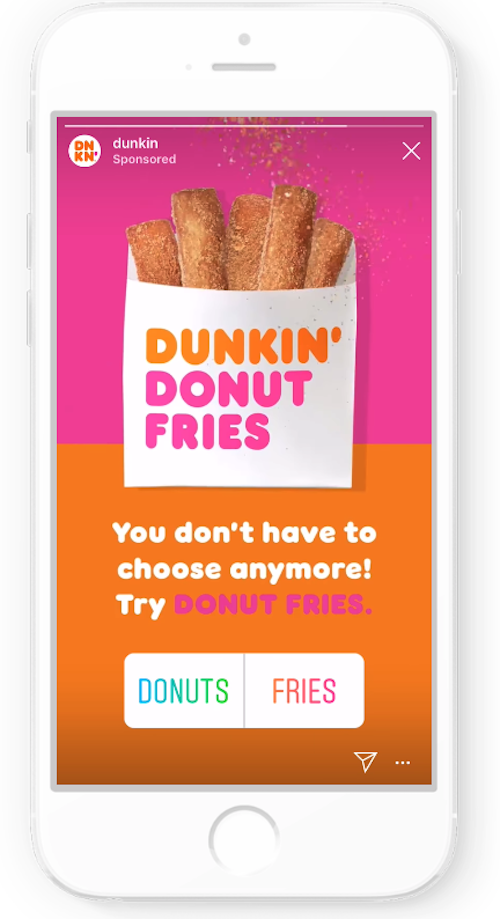
How do you set up a poll?
To set up a poll, go to your Ads Manager and select a Reach, Brand Awareness, Traffic, or App Installs campaign. Then, choose Instagram Stories as your only ad placement, and the option to add an interactive poll will appear when you go to add your content.
__
By Arthur Girault
Want expert support on paid social, or your broader digital marketing strategy? Don't hesitate to reach out!


