
LinkedIn has established itself as the premier professional social networking platform, bringing together more than 740 million users. It's a goldmine for businesses and professionals looking to build awareness, grow their networks, establish expertise, and attract high-quality leads.
Standing out on LinkedIn, however, remains a real challenge in the face of fierce competition and a selective algorithm. How do you captivate your target audience and convince them to engage with what you have to offer? How do you run advertising campaigns that are impactful and profitable on this platform?
The answer lies in using Document Ads, an innovative ad format offered by LinkedIn. Document Ads give you the opportunity to promote content such as e-books, case studies, white papers, infographics, or presentations directly in users' feeds. LinkedIn members can easily browse and download them without ever leaving the site, enjoying an engaging, interactive user experience.
In this in-depth guide, we'll walk you through everything you need to know about Document Ads: what they are, why they work, how to create and optimize them, and why measuring and analyzing their impact matters. You'll learn how to leverage Document Ads to amplify your visibility, increase engagement, and supercharge your lead generation on LinkedIn.
Understanding the effectiveness of LinkedIn Document Ads
What is a Document Ad?
A Document Ad is an innovative form of sponsored content on LinkedIn. It allows you to share documents such as PDFs or PowerPoint presentations and display them directly in users' feeds. The content can be easily browsed and downloaded by LinkedIn members.
The benefits of Document Ads for content marketing
Using Document Ads in your content marketing strategy offers several key advantages:
- They showcase your expertise and strengthen your brand image by sharing quality content with your audience.
- They capture the attention of your target audience and spark their interest through an attractive, interactive user experience.
- They are an effective way to generate qualified leads, by offering LinkedIn members the chance to share their information in exchange for the full document.
- They allow you to measure the impact of your content through detailed engagement analytics — views, downloads, page interactions, and leads generated.
Document Ads vs. other LinkedIn ad formats
Document Ads stand apart from other LinkedIn ad formats in several ways:
- They drive higher user engagement, enabling content consumption without leaving the LinkedIn feed.
- With greater flexibility, Document Ads give you the freedom to choose the document format best suited to your goals and audience.
- In terms of performance, they deliver a higher conversion rate and a more favorable cost per lead, with an average conversion rate of 9.7% and a cost per lead of $17.80, according to LinkedIn.
How to create and optimize your Document Ads
Choosing the right content for your Document Ad
The success of your Document Ad depends heavily on the content you choose. It must align with your objectives, your target audience, and the message you want to convey. Consider these criteria when selecting the right content:
- Make sure it's relevant and useful to your target audience, addressing their specific needs and pain points.
- Your content must be original and high quality, highlighting your expertise and what sets you apart from the competition.
- It must be attractive and engaging, capturing audience interest and encouraging them to read and download your document.
- It should be concise and straightforward, ensuring easy and intuitive readability, especially on mobile devices, while avoiding technical jargon and oversized images.
Based on your content, choose the most appropriate format, such as PDF, PowerPoint, Word, or Excel. Online tools like Canva or SlideShare can also help you design your document in a professional and visually appealing way.
Key steps to creating your Document Ad
To set up your Document Ad, follow these steps:
- Log in to LinkedIn Campaign Manager and start a new campaign.
- Set your campaign objective by choosing from options such as awareness, consideration, or conversion. For lead generation, select the corresponding objective.
- Define your target audience using LinkedIn's segmentation parameters: location, industry, company size, job title, seniority level, and more.
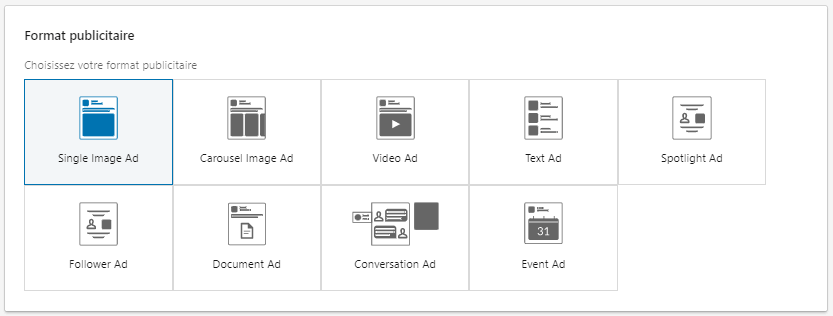
- Select your ad format by choosing "Sponsored Content" and decide where your ad will be shown, such as in the feed or on the audience network.
- Set your budget, schedule your timeline, and build your bidding strategy based on your objective, whether that's impressions, clicks, or conversions.
- Create your Document Ad by uploading your document and writing the ad copy. If you're targeting lead generation, include a dedicated form.
- Launch your campaign and track its performance using the analytics tools provided by LinkedIn.
Best practices to maximize the performance of your Document Ads
Get the most out of your Document Ads by applying these best practices:
- Use a compelling, descriptive headline that highlights the benefit of your document and encourages clicks.
- Choose an attractive, high-quality cover image that represents your document and reinforces your brand.
- Write a clear, direct call to action that prompts your audience to read or download your document, or to fill out your lead gen form.
- Experiment with different variants of your ad, adjusting the copy, image, document, or form to find the winning combination.
- Refine your Document Ad based on the data collected, by tracking key metrics such as views, clicks, downloads, read-through rate, and leads generated, and adjust your budget, targeting, content, or format accordingly to improve your ROI.
Measuring and analyzing the impact of your Document Ads
Setting up conversion tracking
To measure the success of your LinkedIn Document Ads, it's essential to set up conversion tracking. This process tells you how many members took a meaningful action after viewing or interacting with your ad. These actions can include filling out a lead gen form, browsing your website, or purchasing a product.
To configure tracking, start by creating a conversion pixel — a small piece of code to embed on your site. This pixel allows LinkedIn to track the actions of users who interact with your Document Ad. Then define the specific actions you want to monitor, such as sign-ups, downloads, or purchases.
Interpreting data from LinkedIn Analytics
Once conversion tracking is set up, use LinkedIn Analytics data to evaluate the performance of your Document Ads. You'll have access to key metrics, including:
- The total number of impressions, clicks, views, and downloads for your Document Ads.
- The click-through rate (CTR), indicating the ratio of clicks to impressions.
- The cost per click (CPC), representing the average cost per interaction with your ad.
- The number of conversions, showing how many users took a meaningful action.
- The conversion rate, which is the ratio of conversions to clicks.
- The cost per conversion, quantifying the average cost for each valuable action achieved.
These metrics help you measure the effectiveness of your Document Ads in terms of awareness, engagement, and lead generation. They also allow you to compare results across different ads, ad groups, and campaigns.
Optimizing your campaigns based on performance analysis
Analyzing performance helps you identify what's working and what needs improvement in your ad campaigns. With this data, you could:
- Adjust your budget based on the return on investment observed.
- Refine your targeting based on the characteristics of members responding to your ads.
- Optimize your ad content to make it more compelling and relevant.
- Experiment with different formats to discover which type of content generates the most interest and conversions.
- Apply LinkedIn's recommendations to improve your performance, such as adding keywords, adjusting bids, or creating new ads.
Conclusion
Document Ads represent a revolutionary and effective advertising method on LinkedIn. They offer the opportunity to share your content directly in the feed of your targeted prospects, allowing you to showcase your expertise, capture attention, spark interest, and create a steady flow of qualified leads.
To get the most out of Document Ads, it's crucial to select the right content, carefully craft and optimize your ads, and then closely monitor your performance to measure and adjust as needed. It's also essential to tailor your approach based on your goal, the audience you want to reach, and the message you want to convey.
When you're ready to unlock the full potential of Document Ads to amplify your content marketing strategy on LinkedIn, don't hesitate to take the plunge. Get started right now by creating your very first ad in just a few minutes, following the guidance in this guide.
Want help with your digital marketing strategy? Don't hesitate to reach out!
FAQs
Q: How do you run LinkedIn Ads?
A: To launch an ad campaign on LinkedIn, follow these essential steps:
- Start by creating a LinkedIn Page for your business to showcase your brand and offerings.
- Then, open an account in Campaign Manager to manage your ad campaigns.
- Choose a campaign objective, which can be to build awareness, drive consideration, or boost conversions.
- Define your target audience by leveraging LinkedIn's targeting options.
- Select an ad format suited to your message, from Sponsored Content, Message Ads, Dynamic Ads, or Text Ads.
- Create your ad and launch it by carefully following the Campaign Manager instructions.
Q: What budget do you need for LinkedIn Ads?
A: The budget allocated to LinkedIn Ads varies depending on your specific objectives, the size of your audience, and your overall strategy. While there's no one-size-fits-all answer, here's what to keep in mind:
- LinkedIn states that a minimum daily budget of $10 is required to start a campaign, regardless of the ad type.
- According to IMPACTABLE's recommendations, your monthly budget can range from $500 to $3,000 depending on whether you use retargeting and how much traffic you generate.
- According to Databox, most LinkedIn advertisers spend between $1,000 and $2,000 per month on ads, with a median budget of $1,344.43 in April 2023.
Q: Why advertise on LinkedIn?
A: Choosing LinkedIn Ads gives you the advantage of reaching a high-quality professional audience that is directly interested in your offer. You can target prospects based on relevant B2B criteria, such as industry, job function, or skills. In addition, the platform offers a variety of ad formats that align with your objectives, including Conversation Ads, Sponsored Content, and Text Ads. Advertising on LinkedIn supports lead generation, brand awareness growth, and stronger customer relationships.


