
TikTok is a short-form video-sharing platform that has achieved phenomenal success worldwide. With more than 2 billion downloads and over 800 million active users per month, TikTok gives brands and creators a unique opportunity to reach a massive, highly engaged audience.
But how do you stand out on TikTok and grab users' attention? How do you create effective and profitable ads on this platform? How do you analyze the performance of your advertising campaigns and benchmark them against your competitors?
The answer to all these questions lies in a free and powerful tool provided by TikTok: TikTok Ads Library. It's an ad library that lets you browse ads running on TikTok, filter them by various criteria, and extract valuable insights to optimize your advertising strategy.
In this article, we'll walk you through TikTok Ads Library, how it works, its benefits, and how to use it to boost your advertising campaigns on TikTok. Let's dive in!
What is TikTok Ads Library?
Definition of TikTok Ads Library
TikTok Ads Library is an ad library that is part of the Creative Center, a suite of creative tools provided by TikTok to help advertisers create content that fits the platform.
TikTok Ads Library lets you browse ads that ran on TikTok over the past 30 days, in video, image, or collection formats. You can also access ads that ran on other apps in the ByteDance group, such as Vigo Video, Helo, or BuzzVideo.
TikTok Ads Library gives you access to detailed information on each ad, including the advertiser's name, publication date, number of views, number of likes, number of comments, number of shares, engagement rate, link to the landing page, and link to the advertiser's TikTok profile.
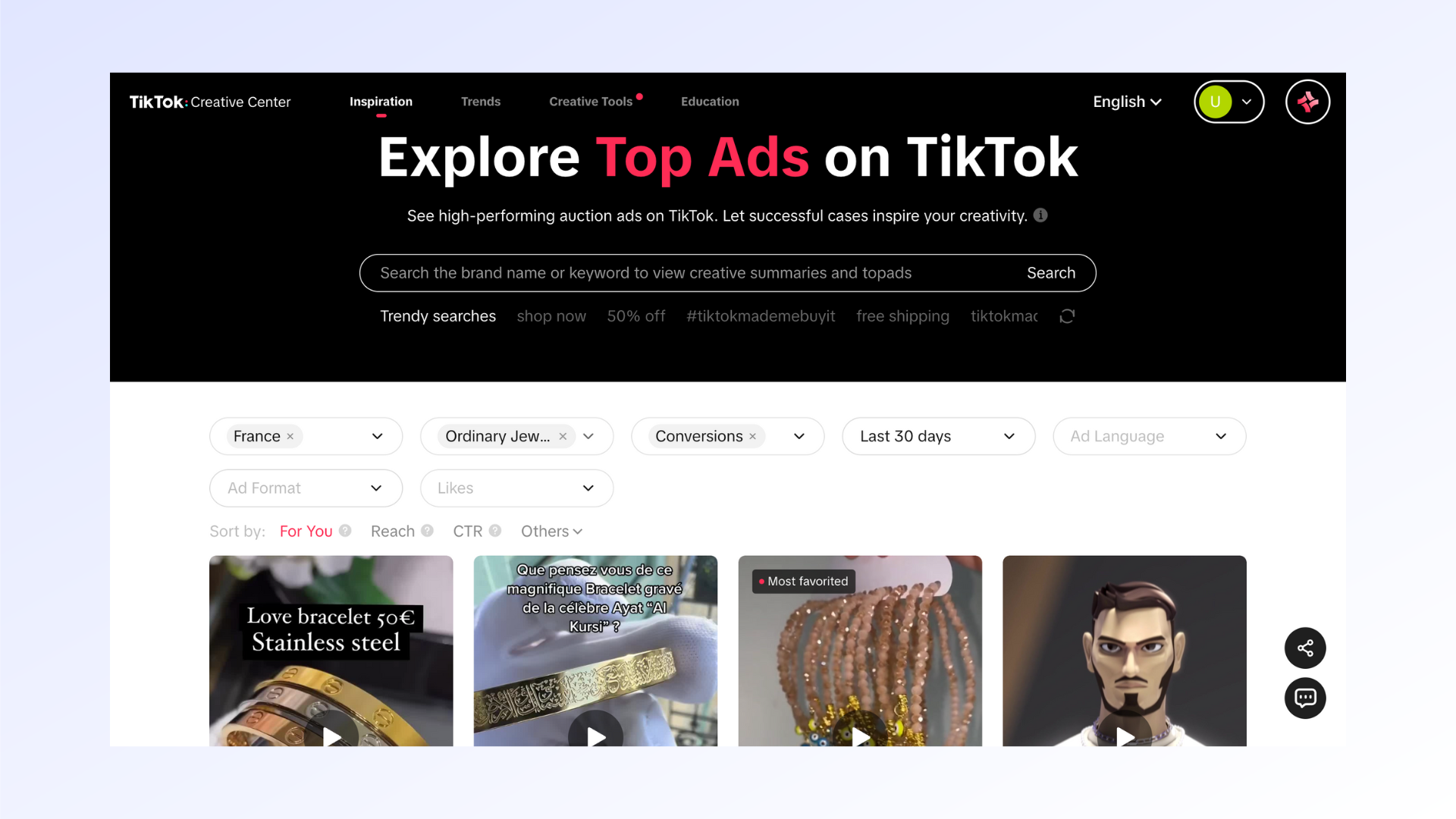
How does TikTok Ads Library work?
TikTok Ads Library works like a search engine that lets you find ads based on different criteria. You can search by keyword, country or region, industry category, campaign objective, ad format, or brand name.
For example, if you want to see ads related to the tourism sector in France, you can enter "tourism" as a keyword, select "France" as the country or region, and choose "Drive traffic" as the campaign objective. You'll then get a list of ads matching those criteria.
You can also sort results by publication date or number of views. You can display ads in a grid or list view. Clicking on an ad lets you watch it in full screen and access the detailed information mentioned above.
How to use TikTok Ads Library
Signing up and accessing TikTok Ads Library
To access TikTok Ads Library, you first need to sign up on TikTok For Business, TikTok's official advertising platform. You'll need to provide some basic information such as your name, email address, phone number, country or region, and industry category.
Once signed up, you can access TikTok Ads Library by clicking on "Creative Center" in the top right menu, then on "TikTok Ads Library" in the submenu. You can also access TikTok Ads Library directly by entering the URL [https://ads.tiktok.com/business/creativecenter/inspiration/topads/pc/en] in your browser.
Features and navigation in TikTok Ads Library
As we've seen, TikTok Ads Library lets you search and browse ads running on TikTok and other ByteDance apps. But there's more. TikTok Ads Library also offers additional useful features, such as:
- The ability to save ads you like to a favorites list by clicking the heart icon at the bottom right of each ad.
- The ability to share ads with others by clicking the arrow icon at the bottom left of each ad. You can copy the link to the ad or send it by email, SMS, or other apps.
- The ability to download ads in video or image format by clicking the downward arrow icon at the top right of each ad. You can then use these ads as inspiration when creating your own advertising content.
- The ability to report ads that don't comply with the platform's rules by clicking the exclamation mark icon at the top right of each ad. You can then choose the reason for the report, such as "Inappropriate content", "Misleading content", or "Offensive content".
To navigate TikTok Ads Library, you can use the search bar at the top of the page or the menu on the left side. The menu lets you filter ads by the following criteria:
- Country or region: choose the country or region where the ads ran, from a list of more than 40 options.
- Industry category: choose the industry category the ads belong to, from a list of more than 20 options.
- Campaign objective: choose the campaign objective targeted by the ads, from a list of 4 options: "Drive traffic", "Increase conversions", "Boost engagement", or "Build awareness".
- Ad format: choose the ad format used, from a list of 3 options: "Video", "Image", or "Collection".
- Brand name: enter a specific brand name to see the ads it ran on TikTok.
Optimizing your advertising strategy with TikTok Ads Library
Finding inspiration in TikTok Ads Library
One of the main benefits of TikTok Ads Library is that it helps you find inspiration for creating your own advertising content on TikTok. By browsing ads running on the platform, you can discover what works best with users and draw on that to adapt your strategy to your audience and objectives.
Examples of successful ads
To find examples of successful ads on TikTok Ads Library, you can sort results by number of views. This lets you see the ads that attracted the most user attention and analyze the elements that contributed to their success.
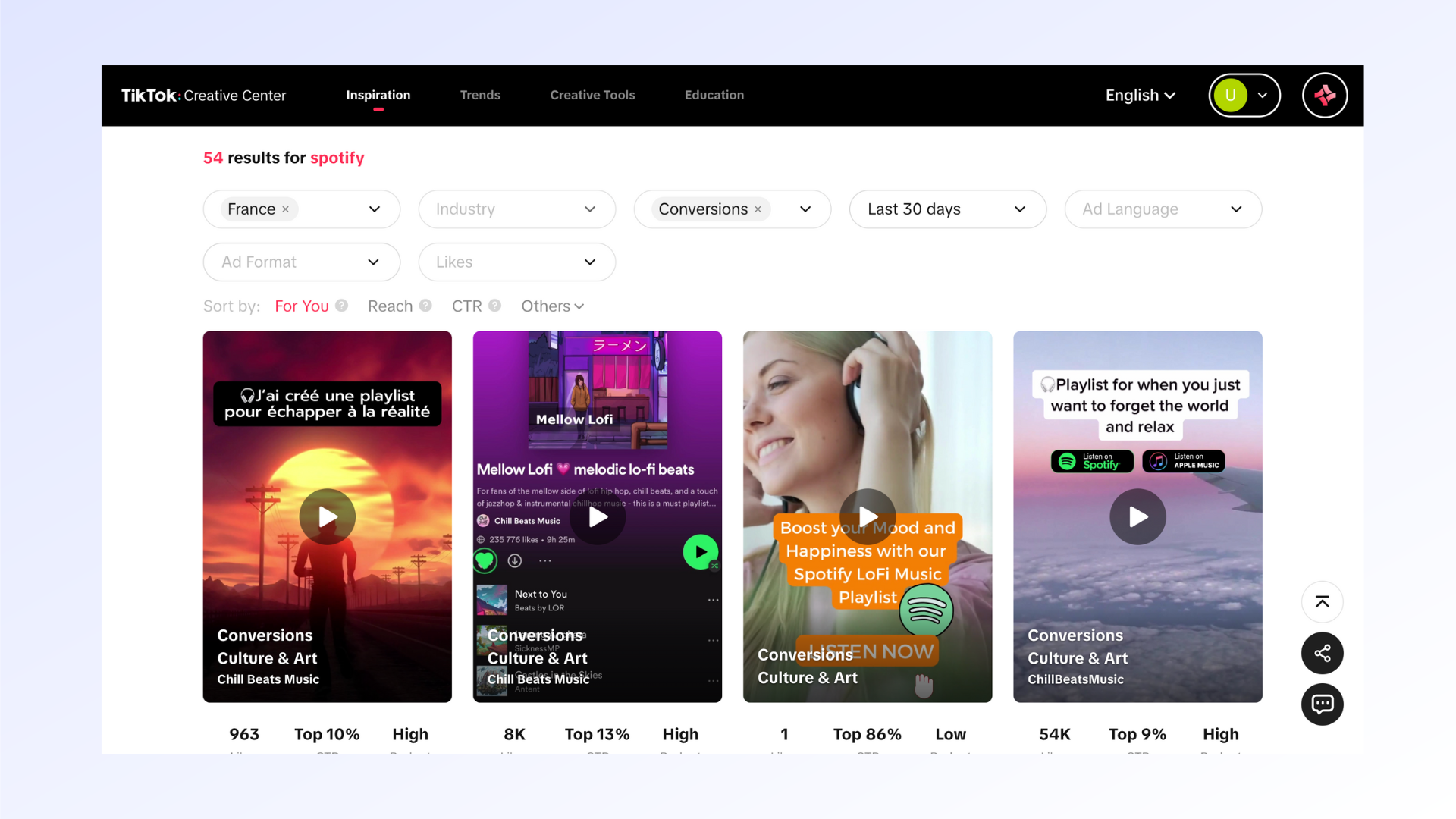
For example, a Spotify ad that racked up more than 10 million views on TikTok. This ad uses several key elements to capture users' attention:
- A short, dynamic video format that fits the vertical screen format and matches the rhythm of the music.
- A simple, clear message that highlights the benefits of Spotify, such as listening to music for free, creating your own playlists, or discovering new artists.
- An effective call to action that invites users to download the Spotify app by clicking the "Install now" button.
You can use this example as inspiration when creating your own video ads on TikTok, drawing on the creative tools the platform provides, such as filters, stickers, special effects, or the music library.
Advertising trends on TikTok
Another way to find inspiration in TikTok Ads Library is to follow advertising trends on TikTok. The platform is constantly evolving, and users are always looking for novelty and originality. It's therefore important to stay on top of the latest innovations and best practices in TikTok advertising.
To do this, you can sort results by publication date. This lets you see the most recent ads running on TikTok and identify the elements driving their success. You can also compare current ads with older ones to observe changes and shifts in styles, formats, messages, or objectives.
For example, a Netflix ad that recently ran on TikTok. This ad uses several trending TikTok elements:
- A collection format that lets you showcase multiple products or services in a single ad. Here, Netflix highlights several original series available on its platform, such as Stranger Things, The Witcher, or Money Heist.
- A humorous and offbeat style that plays on the contrast between dramatic scenes from the series and funny character comments. For example, Eleven from Stranger Things says "I'm a normal girl" while using her telekinetic powers.
- Interaction with users, who are invited to swipe up to discover more Netflix content. This gesture creates a sense of curiosity and engagement among users.
You can use this example as inspiration when creating your own collection ads on TikTok, drawing on the creative tools the platform provides, such as Smart Video Soundtrack, which automatically syncs music to your visuals.
Benchmarking your strategy against competitors on TikTok Ads Library
Another benefit of TikTok Ads Library is that it lets you benchmark your advertising strategy against your competitors on TikTok. By browsing ads from other brands in your industry, you can analyze their strengths and weaknesses and draw lessons to improve your own strategy.
Analyzing competitors' ads
To analyze competitors' ads on TikTok Ads Library, you can use the brand name criterion to search for ads run by a specific brand. You can also use the industry category criterion to see ads run by brands in the same sector as yours.
For example, if you're a sportswear brand, you can search for ads run by Nike or Adidas on TikTok Ads Library. You'll then be able to observe the following:
- The style and tone of the ads, which reflect each brand's identity and values. For example, Nike often uses inspiring and motivational slogans like "Just do it" or "Play new", while Adidas leans into creativity and originality with "Impossible is nothing" or "Change is a team sport". - The targeting and positioning of the ads, which aim to reach a specific audience and differentiate from other brands. For example, Nike tends to target elite athletes and performance enthusiasts, while Adidas speaks more to young people and fans of urban culture.
- The performance and results of the ads, which indicate the level of effectiveness and ROI for each strategy. For example, you can compare the number of views, likes, comments, shares, and engagement rate of Nike and Adidas ads to see which generated the most interest and interaction among users.
Using this information to improve your strategy
By analyzing competitors' ads on TikTok Ads Library, you can draw lessons to improve your own advertising strategy on TikTok. For example, you can:
- Identify best practices and mistakes to avoid by observing what works well or poorly for your competitors. For example, you can spot the elements that make an ad attractive or off-putting, such as the choice of music, text, colors, or special effects.
- Find opportunities and niches to tap into by detecting unmet needs and expectations from your audience. For example, you can spot emerging trends or underserved market segments your competitors haven't addressed, and position yourself there to stand out.
- Adjust your budget and advertising objectives by evaluating the level of competition and profitability in your sector. For example, you can estimate the cost and return on investment of your TikTok ad campaigns based on the number and quality of ads your competitors are running.
Other benefits of using TikTok Ads Library
Advertising transparency on TikTok
Another benefit of TikTok Ads Library is that it contributes to transparency in TikTok advertising. By allowing anyone to browse ads running on the platform, TikTok Ads Library promotes trust and safety for users, advertisers, and regulatory authorities.
For users, TikTok Ads Library lets them know who the advertisers running ads on TikTok are, what their intentions are, and what their information sources are. This way, they can form their own opinion about the advertising content they see and avoid the risks of manipulation or misinformation.
For advertisers, TikTok Ads Library helps them comply with TikTok's rules and ethical standards for advertising. This way, they can ensure the quality and legality of their advertising content and avoid penalties or complaints.
For regulatory authorities, TikTok Ads Library lets them monitor and regulate advertising activity on TikTok. This way, they can verify compliance with the laws and regulations in each country or region and intervene when issues or disputes arise.
TikTok Ads Library: evolution and updates
A final benefit of TikTok Ads Library is that it evolves and is updated regularly to meet the needs and expectations of users and advertisers. TikTok is an innovative and dynamic platform that is always working to improve its services and features.
To do this, TikTok Ads Library draws on feedback and suggestions from users and advertisers to make changes and improvements to its tool. For example, TikTok Ads Library recently added the ability to browse ads running on other ByteDance apps, as well as the ability to download ads in video or image format.
As a result, TikTok Ads Library stays at the cutting edge of technology and creativity, offering users and advertisers an optimal and personalized experience.
Conclusion
TikTok Ads Library is a free and powerful tool that lets you browse ads running on TikTok, filter them by various criteria, and extract valuable insights to optimize your advertising strategy.
By using TikTok Ads Library, you can:
- Find inspiration to create your own advertising content on TikTok by discovering examples of successful ads and advertising trends on TikTok.
- Benchmark your strategy against your competitors on TikTok by analyzing their strengths and weaknesses and finding opportunities and niches to tap into.
- Benefit from the transparency of advertising on TikTok by knowing who the advertisers running ads on TikTok are, what their intentions are, and what their information sources are.
- Take advantage of TikTok Ads Library's evolution and updates by staying on top of the latest innovations and best practices in TikTok advertising.
To access TikTok Ads Library, you need to sign up on TikTok For Business, TikTok's official advertising platform. You can then access TikTok Ads Library by clicking "Creative Center" in the top right menu, then "TikTok Ads Library" in the submenu. You can also access TikTok Ads Library directly by entering the URL [2] in your browser.
Don't wait, and start using TikTok Ads Library today to boost your advertising campaigns on TikTok!
Want guidance on your digital marketing strategy? Feel free to reach out!
FAQs
Q: How much does it cost to use TikTok Ads Library?
A: TikTok Ads Library is a free tool that doesn't require payment to browse ads running on TikTok. However, if you want to run your own ads on TikTok, you'll need to pay based on the model you choose (cost per click, cost per thousand impressions, cost per view, etc.).
Q: How do you create an ad on TikTok?
A: To create an ad on TikTok, you first need to sign up on TikTok For Business, TikTok's official advertising platform. You'll then need to create an advertiser account, choose a campaign objective, set a budget and schedule, create your ad content, choose your targeting and placement, and launch your campaign.
Q: How do you measure the performance of your TikTok ads?
A: To measure the performance of your TikTok ads, you can use the TikTok For Business dashboard, which gives you access to detailed statistics on your ad campaigns. You'll be able to track key metrics such as number of impressions, number of clicks, click-through rate, cost per click, number of conversions, conversion rate, cost per conversion, return on ad spend, and more.
Q: How do you optimize your TikTok ads?
A: To optimize your TikTok ads, you can use the tips and best practices provided by TikTok For Business, which help you create advertising content that fits the platform and your audience. You can also test and adjust different campaign parameters, such as budget, targeting, placement, format, or message, to find the optimal combination that will help you reach your goals.


