
Last May, Google made waves at its annual Google Marketing Live event and announced a host of new features and tools to help advertisers find customers online. Among those announcements was a new ad type called Discovery Ads. This new ad format was designed to help advertisers introduce their products to potential audiences across Google.
Discovery Ads allow advertisers to present their products to targeted audiences for the very first time on Google's Discover feed, as well as at the top of YouTube and Gmail. These highly visible ad placements reach users even before they start searching.
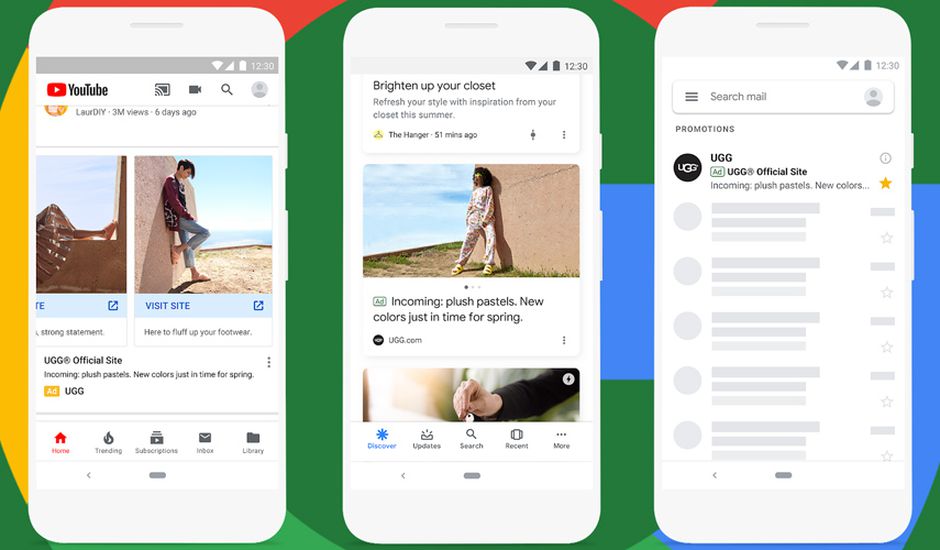
At first glance, this may seem like a brand awareness strategy, but Google's automation can also deliver a strong direct return on investment. Not only do Discovery campaigns drive conversions, they do so at a low cost: the average CPA for Discovery campaigns is currently around $11.30.
Here's everything you need to know to get the most out of this ad type.
Google Discovery Ads formats
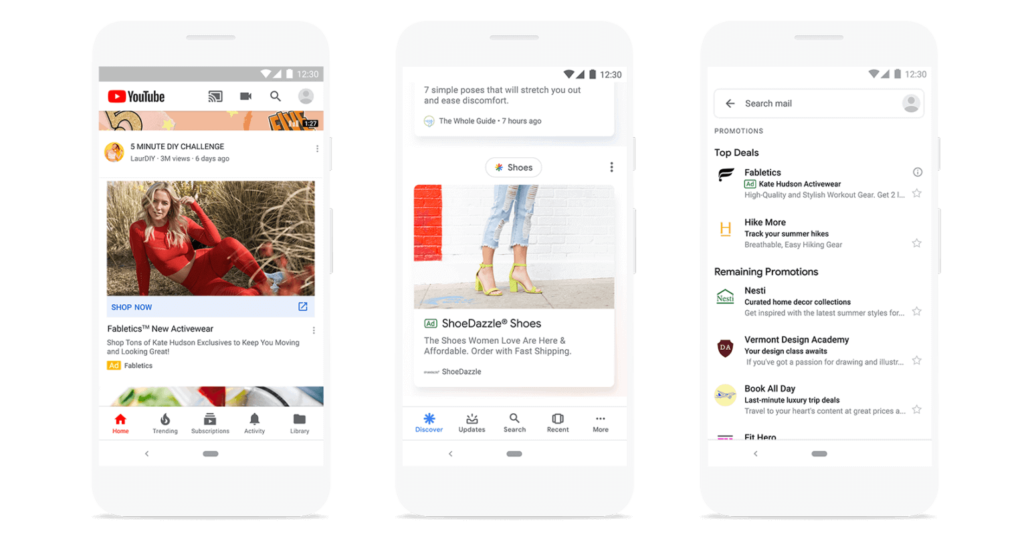
Google Discovery campaigns offer two unique ad formats: standard Discovery ads (single image) and Discovery Carousel ads. Just like Responsive Search Ads (RSA) and Responsive Display Ads (RDA), advertisers provide Google with multiple different inputs, such as several headlines and body texts, so Google can dynamically test different ad variants to serve more personalized messages to different users.
Google Discovery Ads targeting
Unlike paid search campaigns, Google Discovery ads are not targeted through keywords. Advertisers can choose the audiences they want to reach using an audience strategy, including:
- Remarketing: remarketing lets you target your ads to past customers or visitors to your website. You can create different remarketing audiences based on their past interactions (visits to a key page, cart abandonment, recent purchases) to re-engage prospects who already know your brand.
- Demographics: demographic targeting on Google lets you reach users based on their age, gender, parental status, relationship status, education, and homeowner status.
- In-market audiences: in-market audiences consist of users who have recently started searching and browsing and are actively considering making a purchase.
- Affinity and custom intent: affinity and custom intent audiences reach users based on topics and interests they have searched for and browsed in the past.
{{rdv-primary="/cta"}}
Bidding and budgets for Google Discovery ads
Currently, Discovery campaigns only support two bidding strategies:
- Target CPA (Cost Per Acquisition): Google will attempt to drive conversions at a specific cost per conversion. It's recommended to use this strategy if your budget is at least ten times your target CPA.
- Maximize conversions: Google will work to generate the highest number of conversions at the lowest possible CPA. This strategy is better suited to advertisers with a small budget or those who don't expect to see 10 conversions per day.
The average CPA for Google Discovery campaigns is approximately $11.30, which allows most advertisers to get the most out of a modest budget. That said, industries that typically see higher CPAs on search and display should expect CPAs more in line with their account benchmarks.
When first launching or making changes to a campaign, Google recommends waiting two to three weeks between testing new bids or modifying ads, in order to gauge user response and adapt to real-time performance changes.
{{expert-primary="/cta"}}
How to create Discovery campaigns in Google Ads
Creating a Google Discovery campaign is straightforward if you're familiar with the Google Ads interface.
1. Create a new campaign by clicking the blue + icon on the campaigns page.
2. When selecting your campaign goal, choose Sales, Leads, or Website traffic. You can also create a campaign without a goal.
3. Select the Discovery campaign type.
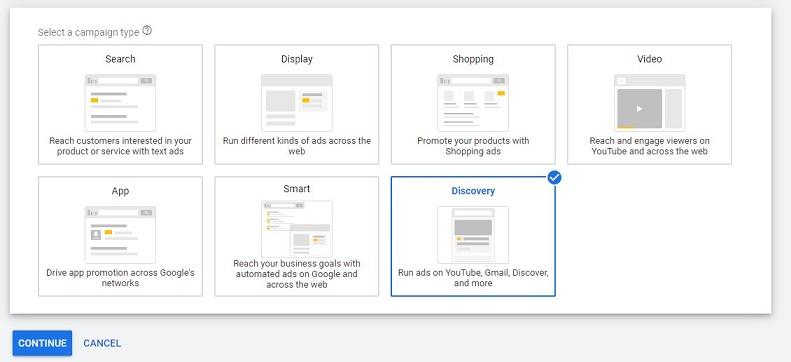
4. Name your new campaign. Select the languages and locations where you want your ads to run.
5. Set your daily budget and the bidding strategy you want Google to use to optimize your Discovery campaign (currently, only Maximize conversions or Target CPA are available).
6. Review the Additional settings if you wish:
- Your campaign needs a defined start and end date
- Your campaign should only run at certain times of day or days of the week
- You want your campaigns to be optimized only for specific conversion actions in your account.
7. Create your first ad group and audience targets. Keep in mind that you can add more ad groups later if you want to target additional audiences.
8. Upload your Discovery ads.
You'll then be prompted to review your new Discovery campaign before launching it. Click the Continue button and your campaign will go live!
Want expert support with Google Ads and your overall digital marketing strategy? Don't hesitate to reach out!


