
With 6 out of 10 searches happening on mobile, securing the top spot in search results guarantees higher click-through rates than your competitors. By activating ad extensions, your ads take up even more screen real estate on smaller displays, which directly boosts your performance.
In this article, we'll take a deep dive into callout extensions and explain exactly why and how to use them effectively to improve your results.
Why Use the Google Ads Callout Extension?
Using the callout extension in Google Ads offers a number of meaningful advantages for your business. Here are some of the most important ones:
- Better quality score: Using callout extensions helps boost the effectiveness of your ads according to Google, improving your Quality Score and therefore your chances of reaching the top position on the search results page.
- Greater visibility: With a callout extension, your ad can occupy more space in search results, increasing its overall visibility.
- More relevance: A callout extension lets you make your ad more relevant to users by surfacing compelling information about your products or services.
For all these reasons, callout extensions on your Search ads give you a real edge over your competitors, completely free of charge. There's no reason to skip them.
How to Use the Google Ads Callout Extension Effectively
Now that we've covered the benefits of callout extensions, let's look at how to get the most out of them.
1. Be Clear and Concise
When creating a callout extension, clarity and conciseness matter. You only have 30 characters to grab the user's attention, so make every one count. Make sure your callout delivers a strong selling point and adds real value for users. Do you offer 24/7 customer service, free shipping, or a free quote? Say so!
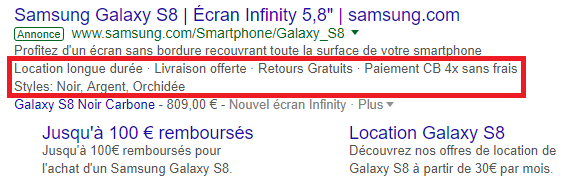
2. Use Relevant Keywords
Relevant keywords are essential for your ad's ranking. Use keywords that relate directly to your product or service to attract qualified users. Choose among the keywords triggering your ad's display and incorporate them into your callout extension to improve its relevance.
3. Use Numbers and Statistics
Numbers and statistics can significantly strengthen the impact of your callout. They help catch users' attention and give them a clear sense of what you're offering. For example, you can use a callout extension to highlight a special promotion or an exclusive deal.
4. Give the Algorithm as Much to Work With as Possible and Let It Test
As with any ad campaign, testing and optimizing your callouts is key to improving results. Try up to 10 variations of your callout to see what performs best and let Google optimize accordingly.
Conclusion
The Google Ads callout extension is a powerful, free feature that can help your business stand out in search results and increase your conversions. By keeping your callouts clear, concise, and relevant, you improve your chances of capturing users' attention and getting them to click on your ad. Activate it in every case, there's no reason not to!
Want support with your digital marketing strategy? Don't hesitate to reach out!
FAQs
Q: How many characters can I use in my callout?
A: You can use up to 30 characters in your callout.
Q: Can I use emojis in my callout?
A: Yes, you can use emojis in your callout, but use them sparingly and make sure they're relevant to your business.
Q: How can I view my callout results?
A: You can view your callout results in the "Ads and assets < Assets" section of your Google Ads account.


