
Promotion extensions are assets that attach to your text ads on Google Ads to highlight your special offers, discounts, or promo codes. They help you capture attention, increase your click-through rates, and improve your return on ad spend. In this article, you'll learn how to create and optimize your promotion extensions, as well as the benefits they bring.
Introduction
What Are Promotion Extensions?
Promotion extensions are additional pieces of information you can add to your Google Ads to promote your special offers. They add value in the form of short text accompanied by a tag symbol. They can include the offer type (e.g., "sale", "free shipping", "promo code"), the offer duration, the discount amount or percentage, and a promo code to use.
Promotion extensions are available for Search, Display, and YouTube campaigns. They can appear on all devices (computers, tablets, and smartphones). They are shown based on the search context, the relevance of the offer, and ad performance.
Why Promotion Extensions Matter in Google Ads
Promotion extensions are important for several reasons:
- They let you stand out from competitors by highlighting your special offers.
- They help you capture the attention of users searching for products or services similar to yours.
- They help you drive action from users who are interested in your offers and want to take advantage of them.
- They let you increase your click-through rates by making your ads more attractive and relevant.
- They let you improve your return on ad spend by generating more conversions and reducing cost per click.
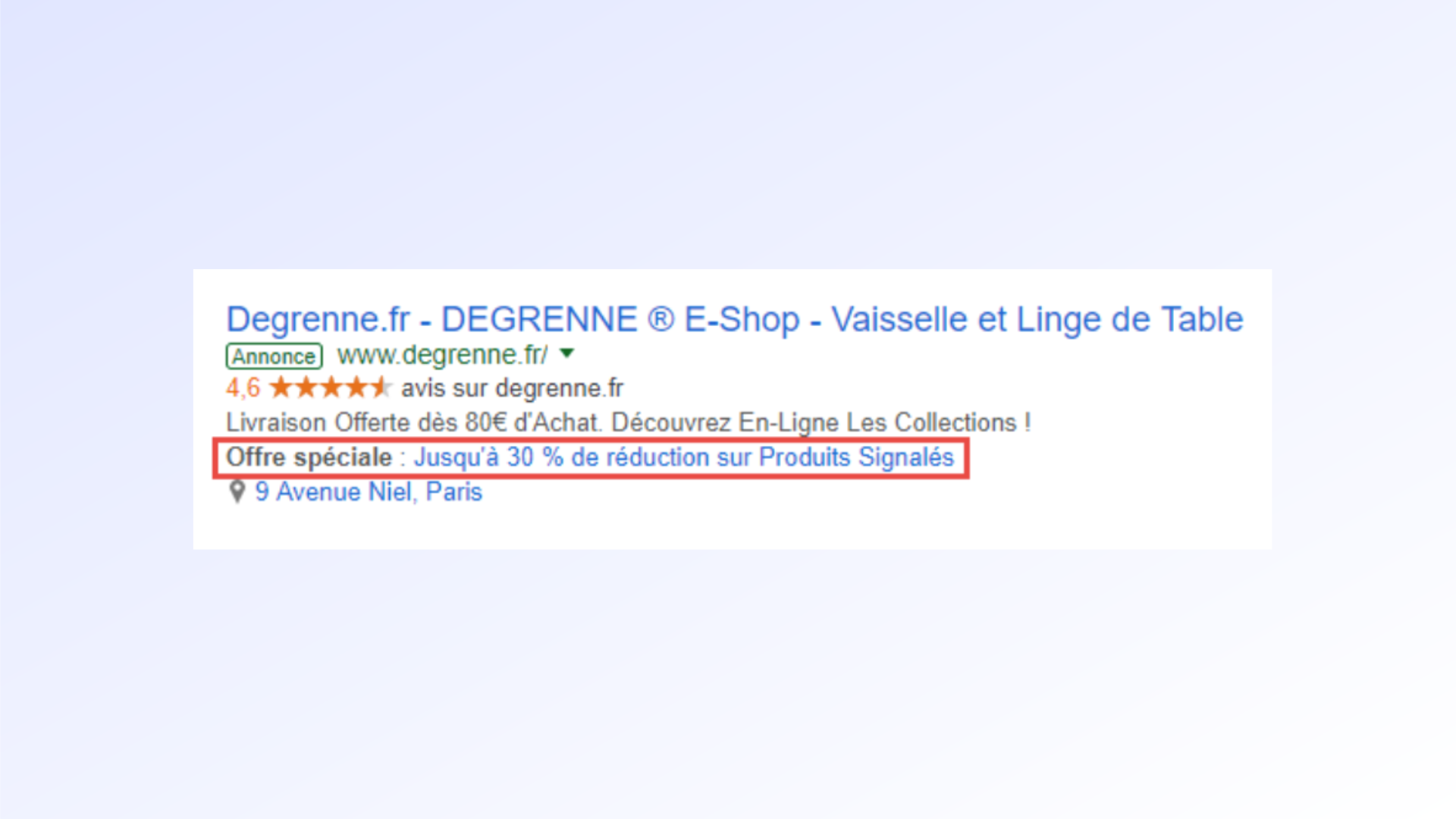
Creating Promotion Extensions
Step-by-Step Setup
To create a promotion extension, follow these steps:
- Sign in to your Google Ads account and click the "Ads and assets" tab, then select "Assets".
- Select "Promotion extension" from the list of extension types.
- Choose the level at which you want to add your extension: account, campaign, or ad group.
- Fill in the required fields: offer type, item being promoted, description, and dates.
- Add optional information if you wish: promo code, custom final URL, custom mobile URL, tracking URL.
- Click "Save" to submit your extension.
Adding Information to Your Ad
When creating a promotion extension, you need to fill in the following fields:
- The offer type: the generic name of your offer, such as "sale", "free shipping", "promo code", etc. You can choose from a predefined list or create your own custom offer type.
- The item being promoted: the specific name of your offer, such as "shoes", "smartphones", "travel", etc. You can enter up to 25 characters.
- The description: the text describing your offer, such as "up to 50% off", "$10 off orders over $50", "buy 2 get 1 free", etc. You can enter up to 10 characters.
- The dates: the period during which your offer is valid, such as "October 1–15", "through December 31", "for 24 hours", etc. You can set a start and end date, or leave the field blank if your offer is ongoing.
Creating Promotion Components
Promotion components are optional elements you can add to your promotion extension to make it more complete and effective. There are two types of promotion components:
- The promo code: the code users need to enter to redeem your offer, such as "WELCOME10", "BLACKFRIDAY", "SUMMER20", etc. You can enter up to 10 characters.
- The custom final URL: the URL users are directed to when they click on your promotion extension, such as "https://www.mystore.com/sale", "https://www.mystore.com/free-shipping", "https://www.mystore.com/promo-code", etc. You can enter up to 2048 characters.
Configuring Optional Settings
In addition to promotion components, you can also configure and save optional settings for your promotion extension, such as:
- Custom mobile URL: the URL users are directed to when they click on your promotion extension from a mobile device, such as "https://m.mystore.com/sale", "https://m.mystore.com/free-shipping", etc. You can enter up to 2048 characters.
- Tracking URL: the URL that lets you track the performance of your promotion extension, such as "https://www.mystore.com/tracking?promo=WELCOME10", etc. You can enter up to 2048 characters.
- Extension schedule: the schedule that lets you define the days and times when you want your promotion extension to appear, such as "Monday through Friday, 9am to 6pm", "weekends, 10am to 10pm", etc. You can choose from a predefined list or create a custom schedule.
Best Practices for Promotion Extensions
When Should You Use Promotion Extensions?
Promotion extensions are especially useful when you want to promote your special offers to users searching for products or services similar to yours. They work well in these situations:
- You're running a one-time or seasonal promotion, such as a sale, Black Friday, Valentine's Day, etc.
- You offer a permanent or recurring deal, such as free shipping, a loyalty program, or a satisfaction guarantee.
- You want to retain existing customers or attract new ones, for example by offering a promo code for the first order, a referral gift, or a voucher for the next purchase.
Tracking Your Promotion Extension Performance
To measure the effectiveness of your promotion extensions, you can review the following metrics in your Google Ads account:
- Impressions: the number of times your promotion extension was shown with your ad.
- Clicks: the number of times users clicked on your promotion extension.
- Click-through rate (CTR): the ratio of clicks to impressions for your promotion extension. It tells you what percentage of users clicked on your extension after seeing it.
- Cost per click (CPC): the average amount you pay for each click on your promotion extension.
- Conversions: the number of actions completed by users after clicking on your promotion extension, such as a purchase, a sign-up, a download, etc.
- Conversion rate: the ratio of conversions to clicks on your promotion extension. It tells you what percentage of users completed an action after clicking on your extension.
- Cost per conversion: the average amount you pay for each conversion generated by your promotion extension.
- Value per conversion: the average revenue you earn for each conversion generated by your promotion extension.
- Return on ad spend (ROAS): the ratio of conversion value to click cost for your promotion extension. It tells you how much you earn for every dollar spent on advertising.
You can access these metrics by clicking the "Ads and extensions" tab, then selecting "Extensions" from the dropdown. You can then filter results by extension type and level (account, campaign, or ad group).
Improving Your Promotion Extension Performance
To optimize your promotion extensions, apply the following tips:
- Test different variations: create several promotion extensions with different offer types, items, descriptions, or promo codes. Compare the performance of each variation and keep the ones that work best.
- Tailor your extensions to your audience: create promotion extensions specific to each campaign or ad group, based on the keywords, products, or services you want to promote. You can also use geographic, demographic, or audience targeting to show your extensions to users most likely to be interested in your offers.
- Refresh your extensions regularly: update your promotion extensions based on seasons, events, or market trends. Remove extensions that are no longer valid or that are underperforming.
Understanding the Cost of Clicks on Promotion Extensions
How Click Costs Are Calculated
Click costs on promotion extensions are calculated the same way as click costs on text ads. They depend on the bidding system you use, the level of competition, and your ad rank. The cost per click is generally lower than the maximum amount you're willing to pay per click (max bid).
You pay for a click on a promotion extension the same way you pay for a click on a text ad. You don't pay more than two clicks per ad impression, even if users click on both your text ad and your promotion extension. You also don't pay for clicks on promotion extensions that don't redirect to a custom final URL.
How to Reduce Click Costs
To reduce click costs on your promotion extensions, apply the following tips:
- Improve ad quality: increase the quality score of your ads by improving their relevance, appeal, and user experience. The quality score is a metric that measures the quality of your ads, keywords, and landing pages. The higher the quality score, the lower the cost per click.
- Optimize your bids: adjust your bids based on your goals, budget, and ad performance. You can also use automated bidding strategies, which automatically adjust your bids based on conversion likelihood or conversion value.
- Target the right audiences: refine your targeting using geographic, demographic, or audience criteria. You can also exclude audiences that aren't interested in your offers or that have a low conversion rate.
Benefits of Promotion Extensions
Drawing More Attention to Your Ad
Promotion extensions help draw more attention to your ad by adding a visual element (the tag symbol) and a text element (the offer description) to your text ad. These elements make your ad more visible and more appealing to users searching for products or services similar to yours.
Boosting Your Click-Through Rates
Promotion extensions boost your click-through rates by encouraging users to click on your ad to take advantage of your special offer. Promotion extensions increase the relevance and added value of your ad, which increases the likelihood that users will click on it.
Improving Your Return on Ad Spend
Promotion extensions help you improve your return on ad spend by generating more conversions and reducing cost per click. Promotion extensions drive user action, which increases the number of sales, sign-ups, downloads, or other actions you want to achieve. Promotion extensions also lower cost per click, which reduces cost per conversion and boosts return on ad spend.
Conclusion
In summary, promotion extensions are assets that attach to your text ads on Google Ads to highlight your special offers, discounts, or promo codes. They let you:
- draw more attention to your ad,
- boost your click-through rates,
- improve your return on ad spend.
Using promotion extensions is important for an effective Google Ads strategy, as it lets you promote your special offers to users searching for products or services similar to yours. It also helps you stand out from competitors, drive action, and retain customers.
To create and optimize your promotion extensions, you should:
- fill in the required fields: offer type, item being promoted, description, and dates,
- add optional promotion components: promo code and custom final URL,
- configure and save optional settings: custom mobile URL, tracking URL, and extension schedule,
- test different variations, tailor your extensions to your audience, and refresh your extensions regularly,
- track extension performance and improve ad quality, optimize your bids, and target the right audiences.
By following these tips, you'll be able to get the most out of promotion extensions in Google Ads.
Want support with your digital marketing strategy? Don't hesitate to reach out!
FAQs
Q: What is a promotion extension in Google Ads?
A: A promotion extension is an ad asset you can add to your Google Ads to highlight special offers, discounts, or temporary promotions.
Q: Why should I use promotion extensions?
A: Promotion extensions capture user attention by highlighting incentives to act, which can increase your ad click-through rate (CTR).
Q: How do I add promotion extensions to my Google Ads?
A: To add promotion extensions, sign in to your Google Ads account, select the campaign or ad you want to edit, then click "Extensions" and choose "Promotion extension".


