
Snapchat is a social network that lets you share ephemeral photos and videos with friends or with the world. With more than 347 million daily active users worldwide, 75% of whom are between 13 and 34 years old, Snapchat is an essential platform for reaching Gen Z and Millennials. But how do you create an effective ad campaign on Snapchat Ads? What are the available formats, the steps to follow, and the best practices to adopt? In this article, we'll explain everything you need to know to launch your first Snapchat Ads campaign.
Discover datashake, the Snapchat Ads agency that helps you achieve your goals.
Why Use Snapchat Ads for Your Business?
Before diving into creating your Snapchat Ads campaign, it's important to understand why this platform can benefit your business. Here are a few arguments that should convince you:
Snapchat's Impressive Reach
Snapchat is one of the most popular apps in the world, with more than 347 million daily active users. In France, more than 22 million users log in to Snapchat every day, which is more than a third of the population. By using Snapchat Ads, you can reach a massive and diverse audience that consumes an average of more than 30 minutes of content per day on the app.
Snapchatter Engagement
Snapchat users are not just passive spectators — they are active participants who create and share content with their friends or with the community. According to a study by Snap Inc., Snapchatters are 60% more likely to make an impulse purchase than non-users, and 46% more likely to recommend a product or service to people they know. By using Snapchat Ads, you can leverage this engagement and influence to boost your brand awareness, traffic, and sales.
The Value of Sharing on Snapchat
Snapchat is a platform that promotes authentic and spontaneous sharing, without filters or staging. Users feel free to express their personality, emotions, and opinions without fear of judgment or comparison. This creates a strong bond between Snapchatters, but also between Snapchatters and the brands that adopt this tone. According to a study by Snap Inc., Snapchatters are 2.5 times more likely to feel close to a brand that communicates on Snapchat than on other social networks. By using Snapchat Ads, you can therefore build a relationship of trust and loyalty with your audience.
Preliminary Steps for Creating Your Snapchat Ads
Now that you're convinced of the value of Snapchat Ads for your business, it's time to get started. Before creating your first ad campaign on Snapchat, there are two essential steps to complete: signing up on Snapchat Ads Manager and installing the Snapchat pixel.
Signing Up for Snapchat Ads Manager
Snapchat Ads Manager is the platform that lets you create, manage, and optimize your ad campaigns on Snapchat. To access it, simply go to the Snapchat Ads Manager website and click "Get Started". You'll then need to enter some information about your business, such as its name, industry, country, and website. You'll also need to accept Snapchat's terms of service and privacy policy. Once your account is created, you'll be able to access the Snapchat Ads Manager dashboard, where you can view your performance, spending, and reports.
Installing the Snapchat Pixel
The Snapchat pixel is a piece of code that you need to install on your website to track the actions of users who click on your Snapchat ads. The Snapchat pixel allows you to measure the effectiveness of your campaigns, optimize your bids, and create custom or lookalike audiences. To install the Snapchat pixel, go to the "Snap Pixel" section of your Snapchat Ads Manager and copy the code provided. Then paste this code into your website's source code, between the <head> and </head> tags. You can also use a tool like Google Tag Manager to make the Snapchat pixel installation easier. Once the pixel is installed, you can verify it's working using the "Snap Pixel Helper" Chrome extension.
Defining Your Snapchat Ads Campaign Objective
Once you've completed the preliminary steps, you can start creating your Snapchat Ads campaign. The first thing to do is define your campaign's objective, meaning the result you want to achieve with your ads. Snapchat Ads offers 11 different objectives, organized into three categories: awareness, consideration, and conversion.
Choosing the Right Objective
To choose the objective that best fits your campaign, you need to ask yourself the right questions: What is the goal of your campaign? Who is the target of your campaign? What stage of the customer journey do you want to reach? What is the success metric for your campaign? Based on your answers, you can select the objective that best matches your needs. For example, if you want to introduce your brand to a new audience, you can choose the "Brand Awareness" objective. If you want to drive users to visit your website, you can choose the "Website Traffic" objective. If you want to generate sales or sign-ups on your website, you can choose the "Conversions" objective.
Naming and Scheduling Your Campaign
After choosing your objective, you need to name and schedule your campaign. These steps are important for effectively organizing and planning your ad campaigns on Snapchat.
How to Name Your Campaign Effectively
To name your campaign, use a clear and descriptive name that indicates the objective, the target audience, the product or service, and the campaign period. For example, if you want to promote a special offer on your cosmetic products to women between 18 and 25 during the month of December, you can name your campaign "Cosmetics Offer Women 18-25 December". This will make it easy to find your campaign in your Snapchat Ads Manager and analyze its performance.
Choosing a Start and End Date
To schedule your campaign, you need to choose a start date and an end date. The start date is the day your ads will begin running on Snapchat. The end date is the day your ads will stop running on Snapchat. You can also choose not to set an end date if you want your campaign to run continuously until you stop it manually. When choosing the start and end dates of your campaign, you need to consider several factors: seasonality, the length of the purchase cycle, the availability of the product or service, the available budget, etc. For example, if you want to take advantage of the holiday season to boost your sales, you can choose a start date at the beginning of December and an end date at the end of December.
Determining Your Campaign Budget
To determine your campaign budget, you need to indicate the maximum amount you want to spend on your campaign. You can choose between two options: a total budget or a daily budget. The total budget is the maximum amount you want to spend over the entire duration of your campaign. The daily budget is the maximum amount you want to spend per day during your campaign. You can modify your budget at any time in your Snapchat Ads Manager. To choose your campaign budget, you need to consider several factors: the cost per result, the return on investment, the level of competition, etc. For example, if you want to achieve 100 conversions on your website and you estimate the cost per conversion is $10, you can set a total budget of $1,000 for your campaign.
Creating Your Ad Set
After naming and scheduling your campaign, you need to create your ad set. An ad set is a group of ads that share the same targeting, delivery, and optimization settings. You can create multiple ad sets per campaign to test different combinations and identify the best performers. To create your ad set, you need to define two key elements: your audience selection and the optimization of your ad delivery.
Selecting Your Audience
Selecting your audience means choosing the users you want to reach with your Snapchat ads. You can use different criteria to define your audience, such as:
- Age
- Gender
- Location
- Interests
- Purchase behavior
- Devices used
- Custom or lookalike audiences
To choose your audience, you should base it on the characteristics of your ideal customer and the data you've collected on your existing customers. You should also adapt your audience to your campaign objective and the size of your budget. For example, if you want to increase your brand's awareness among a broad audience, you can choose a wider and less specific audience. If you want to drive conversions on your website from a qualified audience, you can choose a narrower and more targeted audience.
Optimizing Your Ad Delivery
Optimizing your ad delivery means choosing how your ads will be served on Snapchat, based on your campaign objective and available budget. You can use different parameters to optimize your ad delivery, such as:
- Bid type: this is the payment model you choose for your ads. You can opt for a cost per thousand impressions (CPM), cost per click (CPC), cost per view (CPV), cost per action (CPA), or cost per install (CPI) bid.
- Result optimization: this is the result you want to achieve with your ads. You can choose between impression, click, swipe up, conversion, or install.
- Bid cap: this is the maximum amount you're willing to pay for the chosen result. You can set a fixed or automatic cap.
- Ad delivery: this is the pace at which your ads will be served on Snapchat. You can choose between standard or accelerated delivery.
To optimize your ad delivery, you need to consider several factors: the level of competition, the conversion potential, the return on investment, etc. For example, if you want to maximize the number of impressions your ads get, you can choose a CPM bid with impression optimization. If you want to optimize the number of conversions on your website, you can choose a CPA bid with conversion optimization.
Creating Your Snapchat Ad
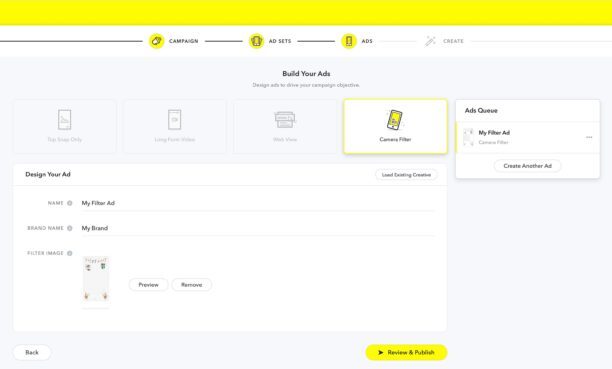
After creating your ad set, you need to create your Snapchat ad. A Snapchat ad is the content you run on Snapchat to promote your product or service. You can choose from several available formats, depending on your campaign objective, your budget, and your creativity.
The Different Available Formats
Video Ads
Video ads are ads that appear as vertical videos from 3 to 180 seconds long, displayed between users' stories or within editorial content. Video ads are ideal for capturing users' attention and helping them discover your product or service. You can add a call-to-action button (CTA) to your video ads to encourage users to click, swipe up, or download your app.
Collection Ads
Collection ads appear as videos or images accompanied by four product or service thumbnails, displayed between users' stories or within editorial content. Collection ads are ideal for showcasing your catalog and driving traffic or sales on your website. You can customize the thumbnails for your products or services and add a call-to-action (CTA) button to your collection ads.
Story Ads
Story ads appear as stories made up of 3 to 20 snaps, displayed in the Discover section of Snapchat. Story ads are ideal for telling a story around your brand and building a connection with your audience. You can add a title, an image, and a description to your story ads and include a call-to-action (CTA) button on each snap.
Lenses
Lenses are ads that appear as interactive filters applied to users' faces or environments, displayed in the Camera section of Snapchat. Lenses are ideal for creating an immersive and playful experience with your brand and encouraging viral sharing. You can create your own lenses using Lens Studio or use the templates provided by Snapchat.
Filters
Filters are ads that appear as graphic frames added to users' snaps, displayed in the Camera section of Snapchat. Filters are ideal for increasing your brand's awareness and capitalizing on key moments like events, birthdays, or holidays. You can create your own filters using Creative Studio or use the templates provided by Snapchat.
Customizing and Creating Your Ads
To customize and create your Snapchat ads, you need to follow a few rules and best practices:
- Follow the technical specs for each format: resolution, duration, file size, etc.
- Adapt the content and tone of your ads to your audience and objective.
- Capture users' attention from the first seconds with an eye-catching visual and a clear message.
- Include a logo or distinctive brand element in your ads.
- Add a relevant and compelling call-to-action (CTA) button to your ads.
- Test different formats, content, and audiences to optimize your performance.
To create your Snapchat ads, you can use Creative Studio, which makes it easy to create video ads, collection ads, or filters. You can also use Lens Studio, which makes it easy to create lenses. You can also work with an agency specializing in Snapchat Ads, which will guide you through the design and delivery of your ad campaigns on Snapchat.
Conclusion
In conclusion, creating a Snapchat campaign can be an extremely effective way to reach and engage your target audience. By following the steps we've covered in this article, from defining your objectives to creating compelling content and tracking performance, you're well equipped to launch a successful campaign on this dynamic platform. Don't underestimate the importance of data analysis for continuously adjusting and improving your strategy. Stay creative, stay authentic, and above all, stay in tune with your audience. With thoughtful planning and careful execution, your Snapchat campaign has the potential to make a memorable impression and propel your brand to new heights of success.
Want help with your digital marketing strategy? Don't hesitate to reach out!
FAQs
Q: What is a Snapchat ad?
A: A Snapchat ad is content you run on Snapchat to promote your product or service. You can choose from several available formats, such as video ads, collection ads, story ads, lenses, or filters. You can also choose from several available objectives, such as awareness, traffic, conversions, or installs. You can create and manage your Snapchat ad campaigns from Snapchat Ads Manager, which lets you define your audience, budget, delivery, and optimization.
Q: How does Snapchat Ads work?
A: Snapchat Ads works on a real-time bidding model, which determines the price and placement of your ads on Snapchat. You can choose between different bid types depending on the result you want to achieve with your ads. You can also choose between different optimization settings depending on the result you want to measure. You can track the performance of your Snapchat ad campaigns from Snapchat Ads Manager, which provides detailed reports on your impressions, clicks, swipe-ups, conversions, or installs.
Q: Why use Snapchat Ads?
A: Snapchat Ads is an advertising platform that lets you reach a massive and engaged audience that consumes ephemeral and authentic content on Snapchat. By using Snapchat Ads, you can leverage Snapchat's impressive reach, Snapchatter engagement, and the value of sharing on Snapchat. You can also create immersive and playful brand experiences and encourage viral sharing. You can also measure the effectiveness of your Snapchat ad campaigns and optimize your performance.


