
LinkedIn is the go-to platform for B2B marketing. With more than 774 million professional members worldwide, LinkedIn gives advertisers enormous potential to reach and influence their target audience.
But how do you stand out on this professional social network, where competition is fierce and users are demanding? How do you create ads that spark interest, trust, and engagement among your prospects?
The answer lies in Thought Leader ads, an innovative and high-performing ad format that lets you promote posts from individual employees at your company, helping you showcase your expertise, credibility, and leadership. Keep in mind that you can also use the LinkedIn Ads ad library to draw inspiration from your competitors' ads or, conversely, to differentiate yourself.
In this article, we'll explain what Thought Leader ads are, why they matter for your LinkedIn strategy, how to set them up and use them effectively, and how to optimize them for maximum impact. We'll also share concrete examples and case studies to inspire you when creating ads on LinkedIn Ads.
Introduction to Thought Leader Ads
What are Thought Leader Ads on LinkedIn?
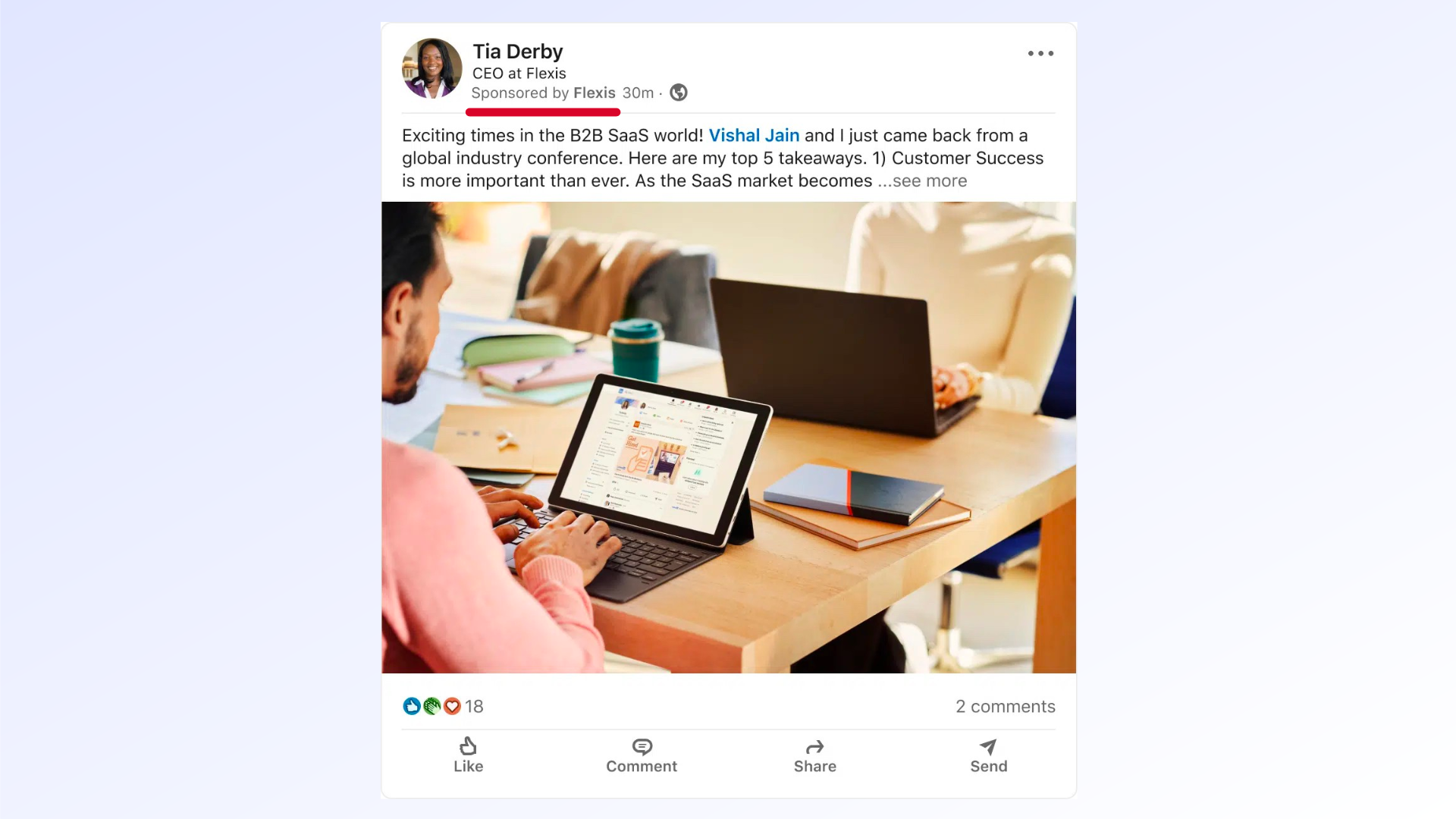
Thought Leader ads are a type of native ad on LinkedIn that lets you sponsor the organic posts of your company's employees and distribute them to a larger, more targeted audience.
These sponsored posts appear in users' feeds with the label "Sponsored" in the top left corner (below your employee's job title at the company). They retain the original post's name, photo, and text, as well as its reactions and comments. They do not include any additional headline, introductory text, or call-to-action button.
Thought Leader ads are available for the Brand awareness and Engagement objectives in Campaign Manager, LinkedIn's advertising platform. They can be created from the Single image ad or Video ad formats. The Article/Newsletter, Document, Poll, and Carousel image ad formats are not eligible for this ad type.
How do Thought Leader ads work?
To create a Thought Leader ad, you first need to select an employee at your company whose profile is public and whose employer matches the company page associated with your ad account. You must also have permission to post sponsored content (Direct Sponsored Content) approved for the company page of the post you want to promote.
Next, you need to choose an existing post from that employee, one that contains either a single image or a video. You can search for the post in Campaign Manager's content library, or copy its link and send it directly to the employee.
Once the post is selected, you send a sponsorship request to the employee, who receives an email notification to approve or decline your request. If the employee accepts, you can then run the post as a Thought Leader ad, choosing your audience, budget, and schedule.
The employee retains full control over their post and can edit or delete their content at any time. If the employee revokes their permission or deletes their post, the ad stops immediately. The campaign will keep running if it contains other ads; otherwise, it will remain active but stop delivering.
Why Thought Leader Ads Matter for Your LinkedIn Strategy
Why use Thought Leader Ads in your LinkedIn campaign
Thought Leader ads are an effective way to strengthen your presence and influence on LinkedIn by putting the voices and opinions of your employees front and center. Your employees are your brand's best ambassadors.
LinkedIn users are looking for relevant, authentic, and inspiring content that adds real value and helps them learn, grow, and connect with other professionals. They are more likely to trust and engage with real people who share their experiences, ideas, and advice than with promotional or institutional messaging.
Thought Leader ads therefore let you build a more human and more personalized relationship with your audience by showing them that you understand their needs, challenges, and aspirations, and that you have the solutions to address them.
The benefits of using Thought Leader Ads
Thought Leader ads offer many benefits for your business, including:
- They increase your brand's awareness and reputation by demonstrating your expertise, credibility, and leadership in your industry.
- They boost audience engagement and loyalty by generating interest, curiosity, and trust, and encouraging reactions, comments, and shares.
- They drive more traffic to your website, company page, or other content through hyperlinks in your sponsored posts.
- They support qualified lead generation by capturing the attention of potential prospects who can then be retargeted with other ads or content tailored to their stage in the funnel.
- They fuel conversion and customer retention by providing useful information, reassuring testimonials, or compelling offers that encourage action.
- They recognize your employees by acknowledging their contributions, spotlighting their expertise, and involving them in your marketing strategy.
- They strengthen your company culture by creating a sense of belonging, pride, and commitment among your team members, who feel more involved and motivated.
Goals you can achieve with Thought Leader Ads
Thought Leader ads can help you reach different marketing goals depending on the type of content you choose to promote, the format you use, and the audience you target.
Here are some examples of goals you can achieve with Thought Leader ads:
- Increase brand awareness: sponsor posts that introduce your company, its values, vision, or mission, or that highlight your achievements, projects, or events. Use the single image or video format and target a broad or segmented audience based on demographic or professional criteria.
- Drive engagement: sponsor posts that share educational, informative, or entertaining content that speaks to your audience's needs or interests. Use the single image or video format and target a specific audience based on behavioral or intent criteria.
- Support lead generation: sponsor posts that offer high-value content, such as a white paper, webinar, or free demo, that encourages your audience to leave their contact details. Use the single image format with a link to a conversion-optimized landing page and target a qualified audience based on criteria linked to your buyer persona.
- Increase conversion and retention: sponsor posts that showcase your products or services, special offers, or customer testimonials that persuade your audience to make a purchase. Use the single image or video format with a link to your website or company page and target a purchase-ready audience based on criteria tied to your sales cycle.
Setting Up and Using Thought Leader Ads
Steps to create a Thought Leader ad
To create a Thought Leader ad, follow these steps:
To make your Thought Leader ads successful, choose carefully which employees' posts you want to sponsor. Here are some criteria to consider:
- Log in to your Campaign Manager account on LinkedIn.
- Click the "Create campaign" button in the top right corner.
- Choose your campaign objective: Brand awareness or Engagement.
- Name your campaign and select the company page associated with your ad account.
- Define your audience using the available targeting criteria.
- Choose your ad format: Single image ad or Video ad.
- Click the "Create new ad" button in the bottom right corner.
- Select the "Thought Leader Ads" option in the top left corner.
- Choose an employee at your company whose profile is public and whose employer matches the selected company page.
- Choose an existing post from that employee that contains either a single image or a video.
- Click the "Send sponsorship request" button in the bottom right corner.
- Wait for the employee to approve or decline your request. You will receive an email notification once the employee has responded.
- If the employee accepts, you can then run the post as a Thought Leader ad by setting your budget and schedule.
Choosing and involving employees in Thought Leader Ads
- The employee should be an expert in their field, capable of sharing relevant, original, high-quality content that adds genuine value for your audience.
- The employee should have a complete, professional, and compelling LinkedIn profile that reflects their expertise, personality, and values.
- The employee should have good visibility and a strong reputation on LinkedIn, with a solid number of connections, followers, and post interactions.
- The employee should be aligned with your company's marketing strategy and respect LinkedIn's rules and best practices for sponsored content.
You also need to involve your employees in the process of creating and distributing Thought Leader ads. Here are some tips:
- Explain the goals and benefits of Thought Leader ads, both for them personally and for the company.
- Get their prior consent before sponsoring their posts, and respect their decision if they decline or change their mind.
- Give them regular feedback on the performance of their sponsored posts and thank them for their contribution.
- Encourage them to keep posting quality organic content that matches their expertise and audience.
Choosing the right content to promote via Thought Leader Ads
To maximize the effectiveness of your Thought Leader ads, you also need to carefully select the content you want to promote. Here are some criteria to consider:
.
- The content should match your campaign objective, your ad format, and the audience you're targeting.
- The content should be relevant, interesting, and useful for your audience, addressing their needs, interests, or pain points.
- The content should be authentic, original, and personalized, reflecting the voice, tone, and style of the employee posting it.
- The content should be clear, concise, and attention-grabbing, with a headline, image, or video that catches the eye, and text that draws people in.
- The content should be engaging, interactive, and persuasive, using questions, polls, testimonials, calls to action, or hyperlinks that encourage reactions, comments, or shares.
Optimizing Your Thought Leader Ads for Maximum Impact
How to analyze and optimize the performance of your Thought Leader Ads
To measure and improve the return on investment of your Thought Leader ads, you need to regularly review the data and performance indicators from your campaigns. Here are some examples of metrics you can track:
- Number of impressions: how many times your ad was displayed to your audience.
- Click-through rate (CTR): the percentage of people who clicked on your ad relative to impressions.
- Cost per click (CPC): the average amount you pay for each click on your ad.
- Engagement rate: the percentage of people who interacted with your ad (reactions, comments, shares) relative to impressions.
- Cost per engagement: the average amount you pay for each interaction with your ad.
- Number of leads: the number of people who expressed interest in your offer or company by leaving their contact details or visiting your website.
- Cost per lead: the average amount you pay for each lead generated by your ad.
- Conversion rate: the percentage of people who completed the desired action (purchase, registration, download) after clicking on your ad.
- Cost per conversion: the average amount you pay for each conversion driven by your ad.
You can access these metrics in Campaign Manager by clicking the "Reports" tab in the top left corner. You can also create custom reports by choosing the metrics, dimensions, and time periods that matter to you. You can export your reports in CSV or PDF format, or email them to yourself or others.
To optimize the performance of your Thought Leader ads, you need to identify the strengths and weaknesses of your campaigns and make the necessary adjustments to improve your results. Here are some examples of actions you can take:
- Adjust your budget or schedule based on campaign performance.
- Refine your targeting based on the characteristics or behaviors of your audience.
- Test different employees, posts, or formats to compare their effectiveness.
- Update the content of your sponsored posts to make them more compelling or persuasive.
The role of A/B ads in optimizing your Thought Leader Ads
To optimize your Thought Leader ads, you can also run A/B ads, a method that involves testing two versions of the same ad with the same audience by changing just one element at a time. The goal is to determine which version performs better according to the chosen metric.
A/B ads let you evaluate the impact of different elements on the performance of your Thought Leader ads, such as:
- The employee whose post you sponsor.
- The type of content you sponsor (image, video, link, etc.).
- The text of the post you sponsor (headline, message, hashtag, etc.).
- The audience you reach with your ad (targeting criteria, size, etc.).
To create an A/B ad, follow the same steps as for a standard Thought Leader ad, with one additional step:
- After choosing your ad format, click the "Create variant" button in the bottom right corner.
- Change just one element of your ad (employee, post, audience) and name your variant.
- Compare the performance of your two variants in Campaign Manager and choose the one that performs best according to your chosen metric.
You can repeat this process as many times as needed, testing different elements and keeping the best-performing variant each time. This will give you the optimal version of your Thought Leader ad.
Using LinkedIn analytics to evaluate the effectiveness of your Thought Leader Ads
To complement the analysis and optimization of your Thought Leader ads, you can also use LinkedIn analytics, which provide valuable insights about your audience, your company page, and your employees.
You can access LinkedIn analytics by clicking the "Analytics" tab in the top right corner of your company page. You can then choose from three analysis categories:
- Visitors: see the number and profile of people who visited your company page, along with traffic sources and pages viewed.
- Followers: see the number and profile of people who follow your company page, as well as follower growth and sources.
- Updates: see the number and type of posts you've shared on your company page, along with the impressions, clicks, reactions, comments, and shares they generated.
You can also access employee analytics by clicking the "Employees" tab in the top right corner of your company page. You can then choose from two analysis categories:
- Activity: see the number and type of posts your employees have shared on LinkedIn, along with the impressions, clicks, reactions, comments, and shares they generated.
- Audience: see the number and profile of people who viewed or interacted with your employees' posts, along with their level of engagement and interest in your company.
This data helps you better understand your audience, measure the impact of your company page and employees on LinkedIn, and identify opportunities to improve your Thought Leader ads.
Thought Leader Ads: Examples and Case Studies
Case study: A company's success with Thought Leader ads
To illustrate the power of Thought Leader ads on LinkedIn, here is a real-world case study of a company that used this ad format to achieve its marketing goals.
The company in question is Salesforce, a global leader in CRM (Customer Relationship Management) offering cloud-based solutions for managing customer relationships. Salesforce's goal was to increase its brand awareness and engagement among IT decision-makers in France by showing how Salesforce could help them innovate and transform digitally.
To do this, Salesforce used Thought Leader ads to sponsor the organic posts of its French employees, who shared educational or inspiring content on IT industry trends and challenges. Salesforce selected expert employees with compelling LinkedIn profiles and strong visibility on the network. Salesforce also targeted a specific audience of IT decision-makers at companies with more than 200 employees in France.
The campaign results were impressive: Salesforce achieved an engagement rate of 1.24%, four times higher than the LinkedIn ad average in France. Salesforce also generated more than 2 million impressions, more than 25,000 clicks, and more than 26,000 interactions (reactions, comments, shares) with its Thought Leader ads. Salesforce successfully strengthened its brand awareness and influence with its target audience by leveraging the voices and opinions of its employees.
Examples of effective Thought Leader Ads
To give you a more concrete sense of Thought Leader ads, here are some examples of sponsored posts from companies on LinkedIn that used this ad format effectively.
Example 1: Thought Leader Ad from Microsoft.
This sponsored post features a testimonial from a Microsoft employee sharing their experience and tips on how to work remotely with Microsoft tools. The post uses a single image showing the employee using their laptop and smartphone. The post text is clear, concise, and compelling, with an attention-grabbing headline ("How I work remotely with Microsoft"), a message that invites reading ("Find out how I stay organized day-to-day to remain productive and connected with my colleagues"), and a hashtag that reinforces the message ("#WorkFromHome"). The post aims to drive engagement and traffic to the Microsoft website, using a hyperlink inviting users to learn more about Microsoft remote work solutions.
Example 2: Thought Leader Ad from HubSpot.
This sponsored post features educational content from a HubSpot employee sharing tips and best practices on digital marketing. The post uses a video showing the employee explaining how to build an effective marketing plan. The post text is relevant, interesting, and useful, with a headline that poses a question ("How do you create a marketing plan?"), a message that delivers added value ("Discover the 6 essential steps to building your marketing strategy"), and a hashtag that identifies the topic ("#MarketingTips"). The post aims to drive engagement and lead generation, using a hyperlink offering a free digital marketing guide download.
Conclusion
In summary, Thought Leader ads are an innovative and high-performing ad format on LinkedIn that lets you promote individual employees' posts and showcase your expertise, credibility, and leadership.
Thought Leader ads let you build a more human and more personalized relationship with your audience by showing them that you understand their needs, challenges, and aspirations, and that you have the solutions to address them.
Thought Leader ads offer many benefits for your business, including: increasing brand awareness and reputation, boosting audience engagement and loyalty, driving more traffic to your website or other content, supporting qualified lead generation, fueling conversion and customer retention, recognizing your employees, and strengthening your company culture.
Thought Leader ads can help you reach different marketing goals depending on the type of content you choose to promote, the format you use, and the audience you target.
Want guidance on your digital marketing strategy? Feel free to reach out!
FAQs
Q: What are Thought Leader ads on LinkedIn and how do they work?
A: Thought Leader ads on LinkedIn are a type of native ad that lets you sponsor the organic posts of your company's employees, highlighting their expertise and credibility. These ads appear in users' feeds with the "Sponsored" label and do not include any additional headline or introductory text.
Q: Why use Thought Leader ads in your LinkedIn strategy?
A: Thought Leader ads strengthen your company's presence and influence on LinkedIn by humanizing your brand. They let you build more authentic relationships with your audience by putting your employees' voices and opinions front and center, generating stronger engagement and trust.
Q: What are the benefits of Thought Leader ads for a business?
A: Thought Leader ads increase brand awareness, boost audience engagement, drive website traffic, support qualified lead generation, fuel conversion and customer retention, recognize employees, and strengthen company culture.


